We use cookles to Improve your online experience. By continuing browsing this website, we assume you agree our use of cookies.

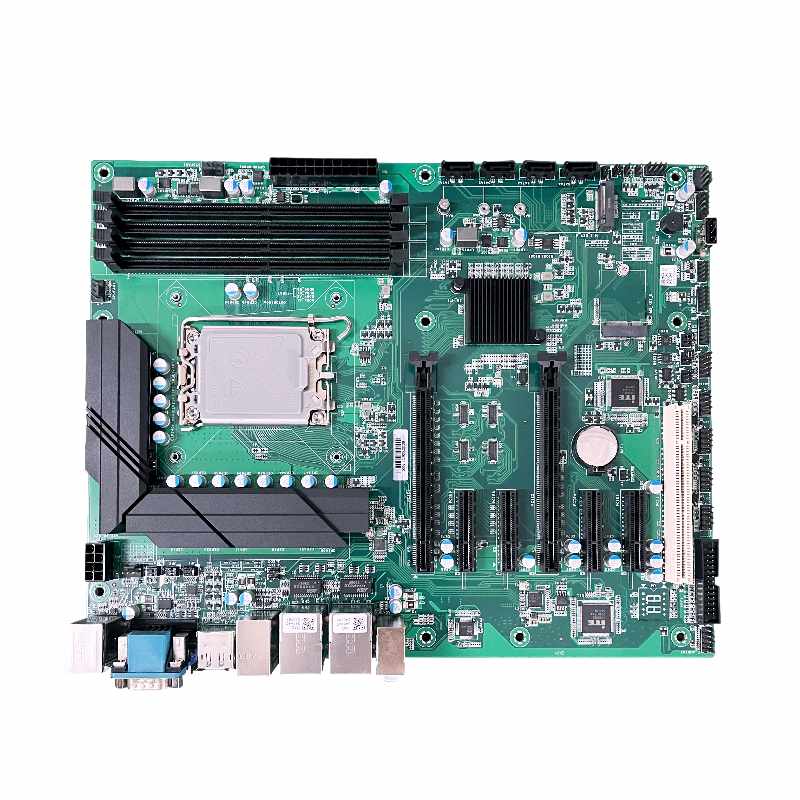
The Budget - Friendly H670 ATX Motherboard: Unleashing Power with 12th/13th/14th Gen Support and 6 PCIe 4.0 Slots at $198
September 8th, 2025
306 views
The Budget - Friendly H670 ATX Motherboard: Unleashing Power with 12th/13th/14th Gen Support and 6 PCIe 4.0 Slots at $198
In the ever - evolving world of PC hardware, finding a motherboard that offers a perfect balance of performance, compatibility, and affordability can be a challenging task. However, the budget H670 ATX motherboard has emerged as a compelling option, especially for those looking to build a powerful yet cost - effective system. With its support for 12th, 13th, and 14th - generation Intel processors and an impressive 6 PCIe 4.0 slots, all available at a price point of $198, this motherboard is making waves in the market.
1. Understanding the H670 Chipset
1.1 Features and Capabilities of the H670 Chipset
The H670 chipset, developed by Intel, is designed to offer a mid - range solution with a host of advanced features. It serves as the backbone of the budget H670 ATX motherboard, enabling seamless communication between various components of the PC. One of the key features of the H670 chipset is its support for high - speed data transfer interfaces. It can handle up to a certain number of PCIe lanes, which is crucial for the 6 PCIe 4.0 slots on the motherboard. PCIe 4.0, as we know, offers data transfer rates that are significantly faster than its predecessors, such as PCIe 3.0. This allows for quick and efficient data transfer between the motherboard and expansion cards, which we will explore in more detail later.
The H670 chipset also has excellent support for memory. It can handle DDR4 memory modules, and in some cases, can support relatively high - speed DDR4 RAM. This is important for overall system performance, as fast memory can reduce the time it takes for the CPU to access data, leading to smoother multitasking and faster application loading times. Additionally, the chipset is optimized to work with the latest Intel processors, ensuring that the motherboard can fully utilize the capabilities of 12th, 13th, and 14th - generation CPUs.
1.2 How the H670 Compares to Other Chipsets in its Class
When compared to other chipsets in the same price range, the H670 stands out in several ways. For example, compared to some lower - end chipsets, it offers more PCIe lanes, which directly translates to more expansion options. This is a significant advantage for users who plan to add multiple high - performance expansion cards to their systems, such as graphics cards for gaming or data acquisition cards for professional applications.
In contrast to some higher - end chipsets, the H670 may lack a few advanced features. However, considering its price point, it offers an outstanding value proposition. It provides most of the essential features that the majority of users need, without the added cost associated with features that are often only used by a niche group of enthusiasts. For instance, while high - end chipsets might offer support for overclocking in a more advanced manner, the H670 still allows for some degree of performance tuning, making it suitable for both casual users and those who want to squeeze a bit more performance out of their systems.
2. Support for 12th, 13th, and 14th - Generation Intel Processors
2.1 Performance Synergy with Different Processor Generations
The ability of the budget H670 ATX motherboard to support 12th, 13th, and 14th - generation Intel processors is a game - changer. Each of these processor generations brings its own set of performance improvements. The 12th - generation Intel processors, codenamed Alder Lake, introduced a hybrid architecture that combined high - performance cores and efficient cores. This architecture allowed for better multitasking performance, as the CPU could allocate tasks to the appropriate cores based on their requirements. When paired with the H670 motherboard, the system could take full advantage of this architecture, with the motherboard's chipset facilitating smooth communication between the CPU and other components.
The 13th - generation Intel processors, Raptor Lake, further enhanced performance, especially in single - threaded applications. They offered higher clock speeds and improved cache management. The H670 motherboard was designed to be compatible with these processors, ensuring that users could experience the performance benefits. For example, in applications such as video editing, where single - threaded performance is crucial for tasks like rendering, the combination of a 13th - generation Intel processor and the H670 motherboard could lead to significantly faster rendering times.
The 14th - generation Intel processors, Meteor Lake, brought new features and improvements in terms of power efficiency and integrated graphics performance. The H670 motherboard, with its support for this latest generation, enabled users to build systems that were not only powerful but also energy - efficient. In scenarios where the integrated graphics of the CPU were used, such as in light gaming or general office work, the combination with the H670 motherboard could provide a smooth and responsive experience.
2.2 Future - Proofing Your System
By supporting three generations of Intel processors, the budget H670 ATX motherboard offers a high level of future - proofing. If you are building a new PC today with a 12th - generation Intel processor, you can be confident that in the future, when you decide to upgrade to a 13th or 14th - generation processor, your motherboard will still be compatible. This saves you from the cost and hassle of having to replace the motherboard every time you want to upgrade your CPU. It also means that you can gradually upgrade other components of your system over time, without having to worry about compatibility issues with the motherboard. For example, if you initially build a system with a mid - range 12th - generation processor and later decide to invest in a high - end 14th - generation processor, the H670 motherboard will be able to handle the upgrade, allowing you to enjoy the performance improvements without major system overhauls.
3. The Advantage of 6 PCIe 4.0 Slots
3.1 High - Speed Data Transfer for Demanding Applications
The 6 PCIe 4.0 slots on the budget H670 ATX motherboard open up a world of possibilities for users with demanding applications. PCIe 4.0 offers data transfer rates of up to 16 GT/s per lane, which is twice as fast as PCIe 3.0. This high - speed data transfer is essential for applications that require the rapid transfer of large amounts of data.
In the field of gaming, for example, a high - performance graphics card can be installed in one of the PCIe 4.0 slots. With the fast data transfer rates, the graphics card can quickly receive data from the CPU and the system memory, resulting in smoother gameplay, higher frame rates, and more detailed graphics. In 4K gaming, where the amount of data that needs to be processed is substantial, the PCIe 4.0 slots can make a significant difference in performance. A PCIe 4.0 - connected graphics card can transfer textures and geometry data much faster than a card connected via PCIe 3.0, reducing the chances of lag and stuttering.
For content creators, such as video editors and 3D modelers, the PCIe 4.0 slots can be used to connect high - speed storage devices, such as NVMe SSDs. These SSDs can read and write data at extremely high speeds, which is crucial for quickly accessing large video files or 3D models. In a video editing workflow, for instance, having an NVMe SSD connected via a PCIe 4.0 slot can significantly reduce the time it takes to load and edit high - resolution video footage. The fast data transfer also allows for seamless scrubbing through the timeline, improving the overall efficiency of the editing process.
3.2 Versatile Expansion Options
The multiple PCIe 4.0 slots also provide extensive expansion capabilities. In addition to graphics cards and storage devices, a variety of other expansion cards can be installed. For users interested in audio production, a high - quality audio interface can be connected via a PCIe 4.0 slot. These interfaces often require a high - speed connection to transfer audio data without latency, and the PCIe 4.0 slots can meet this requirement. This enables musicians and audio engineers to record and edit audio with a high level of precision, without experiencing any audio dropouts or delays.
For those involved in network - intensive applications, such as running a home server or engaging in online gaming with a high - speed connection, a high - performance network interface card can be installed in one of the PCIe 4.0 slots. These cards can offer speeds of up to 10 Gbps or even higher, ensuring a fast and stable network connection. In a home server setup, a 10 Gbps network interface card connected via a PCIe 4.0 slot can allow for quick data transfer between the server and other devices on the network, enabling seamless streaming of high - definition media and fast file sharing.
4. Build Quality and Durability
4.1 Components Used in the Motherboard
The budget H670 ATX motherboard, despite its affordable price, does not compromise on build quality. It is constructed using high - quality components that are designed to withstand the rigors of continuous use. The motherboard's power delivery system, for example, is equipped with high - quality capacitors and voltage regulators. These components are crucial for ensuring a stable power supply to the CPU and other components. High - quality capacitors can filter out electrical noise, preventing it from interfering with the operation of the motherboard. Voltage regulators, on the other hand, ensure that the CPU receives the correct voltage, regardless of the load. This helps to prevent overheating and potential damage to the CPU.
The motherboard also features a robust PCB (Printed Circuit Board) design. The PCB is the physical foundation of the motherboard, and a well - designed PCB is essential for reliable performance. The H670 motherboard's PCB is typically multilayered, which helps to improve signal integrity and reduce electromagnetic interference. The layers of the PCB are carefully designed to route electrical signals between different components, ensuring that the motherboard operates smoothly and efficiently.
4.2 Long - Term Reliability
In terms of long - term reliability, the budget H670 ATX motherboard has been engineered to last. It often comes with features such as heat sinks on critical components, such as the VRM (Voltage Regulator Module). The VRM is responsible for regulating the voltage supplied to the CPU, and it can generate a significant amount of heat during operation. Heat sinks help to dissipate this heat, keeping the VRM at a safe operating temperature. This not only improves the performance of the VRM but also extends its lifespan, contributing to the overall reliability of the motherboard.
The motherboard also undergoes rigorous testing during the manufacturing process. It is tested for various parameters, including electrical stability, compatibility with different components, and resistance to environmental factors such as temperature and humidity. By passing these tests, the motherboard is proven to be reliable and suitable for use in a variety of environments, whether it's a home office, a gaming setup, or a professional workstation.
5. Compatibility with Other Components
5.1 Memory Compatibility
The budget H670 ATX motherboard offers good memory compatibility. As mentioned earlier, it supports DDR4 memory modules. However, the specific memory speeds and capacities that it can support may vary depending on the motherboard model. In general, most H670 motherboards can support DDR4 memory with speeds ranging from 2400 MHz to 3200 MHz natively. Some models may even support overclocking of the memory to higher speeds, such as 3600 MHz or 4000 MHz, although this may require some manual tuning in the BIOS.
When choosing memory for your H670 motherboard, it is important to check the motherboard's manual or the manufacturer's website for a list of compatible memory modules. This ensures that the memory you select will work properly with the motherboard and that you can achieve the best possible performance. Using incompatible memory can lead to issues such as system instability, boot failures, or reduced performance.
5.2 Storage Compatibility
In terms of storage compatibility, the H670 motherboard has a wide range of options. It supports traditional SATA - based storage devices, such as hard disk drives (HDDs) and SATA solid - state drives (SSDs). However, with the presence of 6 PCIe 4.0 slots, it also offers excellent support for NVMe SSDs. NVMe SSDs are much faster than traditional SATA SSDs, as they use the PCIe interface to communicate with the motherboard. This allows for significantly faster read and write speeds, which is beneficial for applications that require quick access to large amounts of data, such as operating system installations, gaming, and content creation.
The motherboard may also support other storage technologies, such as RAID (Redundant Array of Independent Disks). RAID can be used to improve the performance, reliability, or both, of storage systems. For example, a RAID 0 configuration can stripe data across multiple disks, resulting in faster read and write speeds. A RAID 1 configuration, on the other hand, mirrors data across two disks, providing redundancy in case one disk fails. The specific RAID configurations supported by the H670 motherboard may vary depending on the model, so it's important to check the documentation for more information.
6. User Reviews and Real - World Performance
6.1 What Users are Saying about the H670 Motherboard
User reviews of the budget H670 ATX motherboard have been generally positive. Many users have praised its performance, especially when paired with 12th, 13th, or 14th - generation Intel processors. Gamers have reported smooth gameplay and high frame rates, thanks to the motherboard's support for high - performance graphics cards via the PCIe 4.0 slots. Content creators have also been satisfied with the motherboard's ability to handle their demanding applications, such as video editing and 3D modeling. The fast data transfer rates provided by the PCIe 4.0 slots have allowed them to work more efficiently, reducing the time spent waiting for files to load or render.
Users have also commented on the motherboard's build quality and reliability. The use of high - quality components and the overall solid construction have been noted, with many users reporting that their systems have been running stable for long periods without any issues. The motherboard's compatibility with a wide range of components has also been a plus point, as it has allowed users to build customized systems without having to worry about compatibility problems.
6.2 Benchmark Results and Case Studies
Benchmark results further validate the performance of the budget H670 ATX motherboard. In CPU - centric benchmarks, such as Cinebench, the motherboard has shown good performance when paired with different generations of Intel processors. It has been able to fully utilize the processing power of the CPU, resulting in competitive scores. In graphics - intensive benchmarks, such as 3DMark, the motherboard's PCIe 4.0 slots have allowed high - performance graphics cards to perform at their best, achieving high frame rates and scores.
Case studies have also been conducted on systems built with the H670 motherboard. For example, in a video editing case study, a system with an H670 motherboard, a 13th - generation Intel processor, and an NVMe SSD connected via a PCIe 4.0 slot was able to edit and render 4K video footage much faster than a similar system with a motherboard that did not support PCIe 4.0. This demonstrates the real - world benefits of the motherboard's features in a practical application scenario.
7. FAQ
7.1 Can I Overclock with the Budget H670 ATX Motherboard?
While the budget H670 ATX motherboard is not primarily designed for extreme overclocking like some high - end motherboards, it does offer some overclocking capabilities. Some models may allow you to overclock the CPU to a certain extent, usually by adjusting the multiplier or the voltage in the BIOS. However, the degree of overclocking may be limited compared to motherboards specifically designed for overclocking. It's important to note that overclocking can increase the power consumption and heat generation of the CPU, so proper cooling measures should be in place. Additionally, overclocking may void the warranty of the CPU and the motherboard, so it should be done at your own risk.
7.2 What is the Maximum Memory Capacity Supported by the H670 Motherboard?
The maximum memory capacity supported by the budget H670 ATX motherboard typically depends on the number of memory slots and the type of memory it supports. Most H670 motherboards have 4 memory slots and support DDR4 memory. In general, these motherboards can support a maximum of 128 GB of DDR4 memory. However, it's important to check the motherboard's specifications or the manufacturer's website, as some models may have different maximum memory capacities. Additionally, the actual memory capacity you can use may also be limited by the operating system you are using. For example, 32 - bit operating systems are usually limited to 4 GB of memory, regardless of the motherboard's capabilities.
7.3 Are There Any Limitations to the 6 PCIe 4.0 Slots?
Although the 6 PCIe 4.0 slots on the budget H670 ATX motherboard offer great flexibility and high - speed data transfer, there are some limitations. The total available bandwidth for the PCIe slots is shared among all the slots. So, if you install multiple high - bandwidth expansion cards, such as multiple high - end graphics cards, the available bandwidth for each card may be reduced. Additionally, some motherboards may have specific slot configurations or limitations. For example, some slots may operate at a lower speed if certain other slots are occupied. It's important to refer to the motherboard's manual to understand the specific limitations and capabilities of the PCIe slots before purchasing and installing expansion cards.
8. Conclusion
The budget H670 ATX motherboard, with its support for 12th, 13th, and 14th - generation Intel processors and its impressive 6 PCIe 4.0 slots, stands as a standout choice in the mid-range motherboard market—especially at the $198 price point. It addresses the core pain points of budget-conscious users who refuse to compromise on performance or future flexibility: whether you’re building a new system today or planning upgrades tomorrow, this motherboard delivers the versatility and reliability needed to keep up with evolving hardware demands.
For gamers, it unlocks the full potential of high-performance GPUs via PCIe 4.0, ensuring smooth 4K gameplay and reduced latency. For content creators, the multiple PCIe 4.0 slots enable fast NVMe storage and professional expansion cards (e.g., audio interfaces, network cards), streamlining workflows that rely on rapid data transfer. For everyday users and small-business builders, its support for three generations of Intel processors means a single motherboard can power systems from entry-level 12th-gen i3s to high-performance 14th-gen i7s—eliminating the need for frequent motherboard replacements and reducing long-term costs.
What truly sets this motherboard apart is its ability to balance “budget” with “capability.” It avoids the common pitfalls of cheap motherboards (flimsy components, limited expansion, poor compatibility) by using high-quality capacitors, robust PCB designs, and rigorous testing—ensuring stable 24/7 operation for years. At $198, it undercuts many competitors with similar features, making it an ideal choice for anyone looking to maximize value without sacrificing key performance attributes.
If you’re in the market for a motherboard that can grow with your needs—whether you’re a first-time builder, a gamer upgrading from a older platform, or a content creator needing extra expansion slots—this budget H670 ATX motherboard deserves a spot at the top of your list. It proves that you don’t need to spend $300+ to get a motherboard that supports the latest Intel processors, high-speed PCIe 4.0 devices, and long-term reliability.
To get started, check with reputable retailers or motherboard manufacturers for stock availability, and refer to the motherboard’s QVL (Qualified Vendor List) to confirm compatibility with your chosen processor, memory, and storage. For users new to PC building, many manufacturers also offer detailed installation guides and customer support to ensure a smooth setup process.
Copyright © 2005-2025 ShwayPCB : PCB Fabrication and Assembly Manufacturer. All Rights Reserved. POWERED BY UEESHOP


Copyright © 2005-2025 ShwayPCB : PCB Fabrication and Assembly Manufacturer. All Rights Reserved. POWERED BY UEESHOP